

Internationalization
Challenge
Whilst translations have been available for our legacy applications for sometime, our users have not been able to access our new and enhanced applications, such as Comment Explorer or Location Home in local language.
What is it?
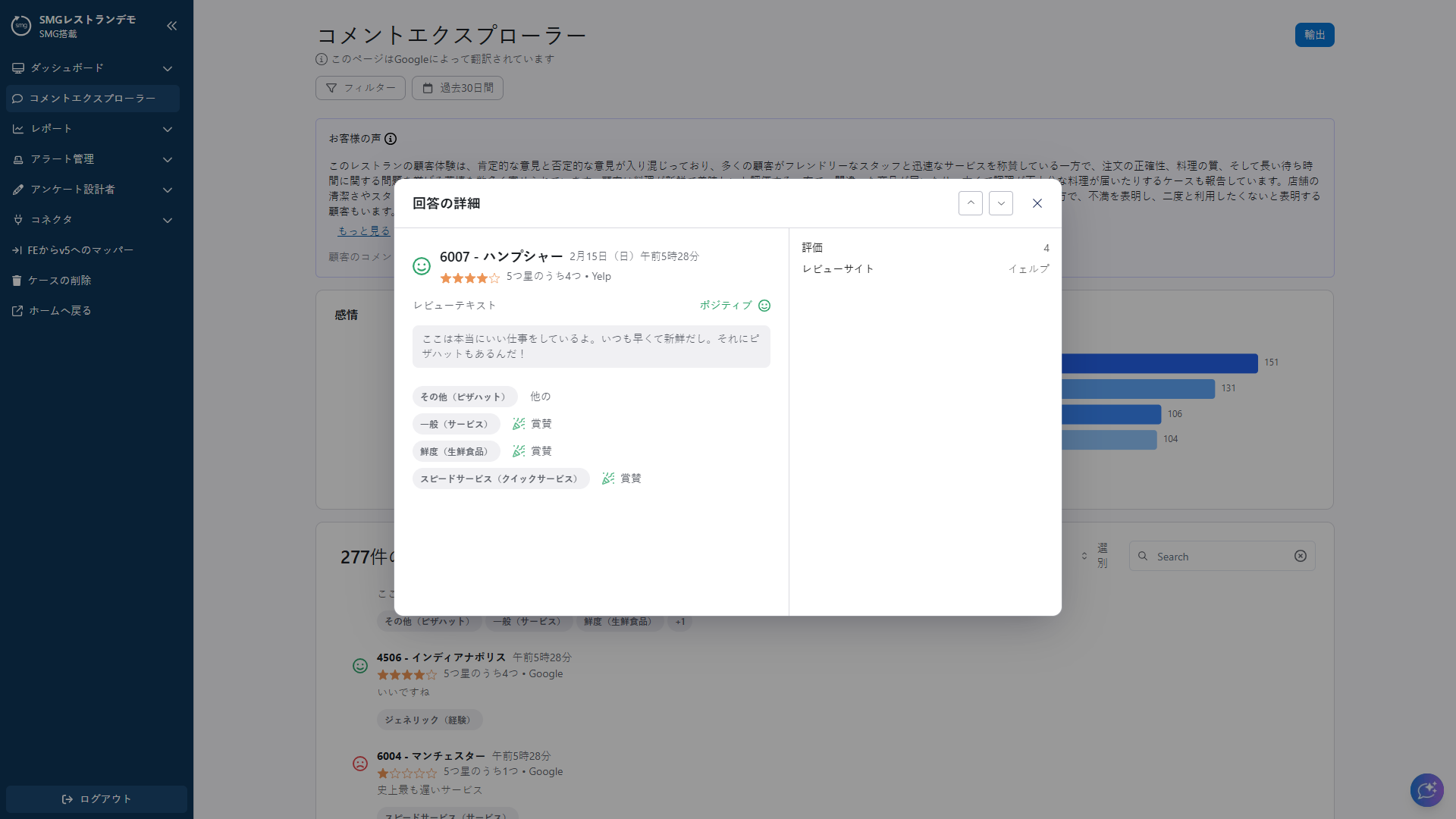
Translation capabilities are now available within Comment Explorer, designed to support non-English feedback across our Global programmes.
With this latest update, all customer comments, no matter of source or what language they were originally written in, are automatically translated into your preferred language. This also applies to our GenAI tools, including AI Summary and Knowledge Agent.
This means every team can easily read, understand, and analyse customer feedback, helping them gain deeper insights and make better decisions across different markets.
Translation is a critical requirement for our Global programmes, enabling consistent insight delivery and empowering local teams to act with confidence.
In addition, the localisation extends beyond customer comments. The entire Comment Explorer interface including labels, navigation and buttons, is now available in your native language, delivering a seamless and intuitive user experience for colleagues worldwide.
Benefits
- Deeper customer understanding across markets. Showcase comments in the users preferred language, aiding analysis, evaluation and action
- Faster time to insight in global programmes. GenAI solutions such as AI Summary and Knowledge Agent available in preferred language to reduce manual effort and accelerate insight to action
- Consistent insight delivery across markets. Translation ensures standardized, comparable insight across global programmes — supporting confident, data-driven decision making at every level
Smg360 Mobile App Android
Challenge
With budgets tight and teams stretched thin, frontline users do not have time to take action on insights that are surfaced within a desktop application. Users need access to an Android mobile app for smg360.
What is it?
Customer-centric organisations act quickly on feedback to improve experiences. But when teams are stretched and resources are limited, turning insights into action isn’t always easy.
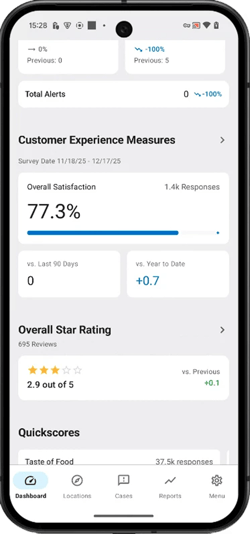
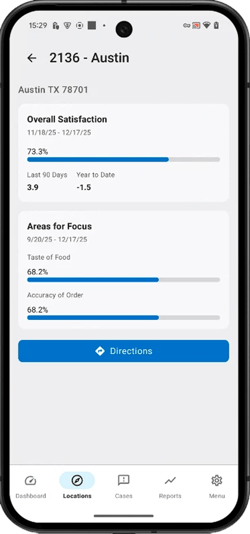
The smg360 mobile app puts customer insights directly at your fingertips, helping teams move faster from insight to action. Track KPIs in real time, identify priority focus areas, and receive alerts when customer issues emerge.
Designed for flexibility and reliability, the smg360 app keeps your teams connected to the voice of the customer wherever they are. With strong performance and high accuracy, even in offline environments, teams can stay informed and take action anytime, on any device.
And with automatic updates, you’ll always have access to the latest enhancements as the app continues to evolve.
Benefits
- Faster time to action. Access key performance metrics, insights, and location-specific actions ‘on the go’ from your mobile device. Manage your customer experience initiatives anytime, anywhere, even in offline environments.
- Reduction is issue resolution time. Instant and reliable alerts of customer issues as they occur. Address concerns swiftly "on the floor," ensuring immediate resolutions and enhanced customer satisfaction.
- The customer at the forefront every decision. With easy access to customer opinions and feedback, ensure that customer-centricity is at the heart of every business decision, even in the boardroom.
- Foster a customer-centric culture. Utilize the app to easily interact with, respond to and understand customer feedback to promote a strong customer focus.
Knowledge Agent Comparisons
Challenge
Comparison has not been supported within Knowledge Agent, with the manual workaround being a multi-step process. We will be solving this problem by allowing users to conduct comparisons within Knowledge Agent within a single click and in seconds.
What is it?
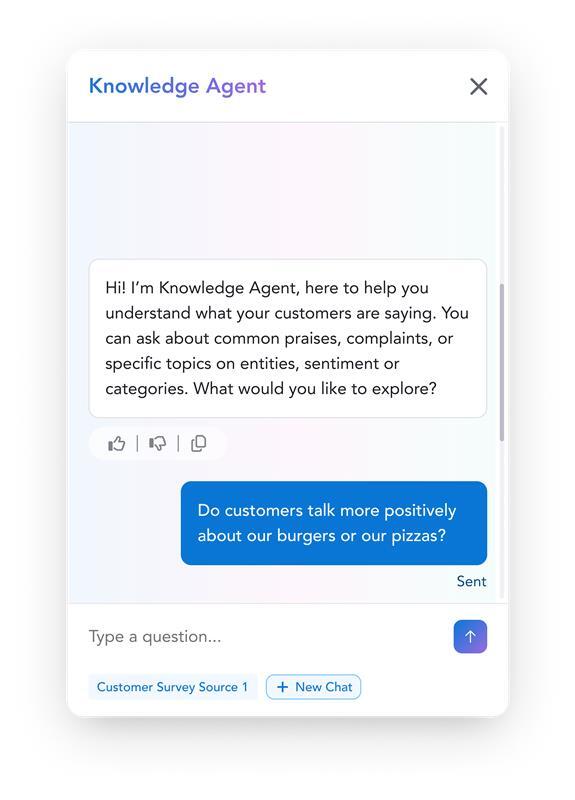
Our commitment to continuous innovation means that Knowledge Agent has just gotten even smarter! Users can now quickly compare performance across products, locations, time periods and more simply by engaging with the Knowledge Agent, with answers in seconds.
Instead of building complex and time consuming reports, Knowledge Agent now delivers instant comparisons across entities, categories, locations, and time ranges in seconds! It can also highlight trends helping teams uncover insights faster and act with confidence.
Benefits
- Faster insights. Comparisons in seconds not hours, replacing manual, multi-step processes with simple questions to the Knowledge Agent, getting users to insight faster
- Deeper analysis. Knowledge Agent is continually becoming smarter, with comparison capability delivering even richer and more impactful answers and insights, to better inform decisions
- Targeted actions. Even more specific answers to your questions, informing targeted actions to drive experience improvements
PPT Export for linked briefs
Challenge
Improving our clients’ experience has always played an important role when we think about creating new functionalities. We know time matters at every stage of a research project: building a survey, getting responses, moderating them, and ultimately reporting those results.
Reporting can often be time-consuming. Turning raw data into clear, actionable insights in a presentation deck takes effort, especially when working across multiple briefs.
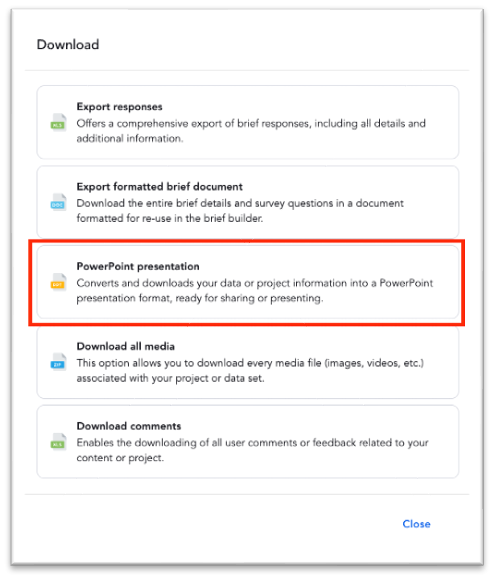
To help with this, we previously launched PPT Export, a feature that downloads responses into a ready-to-use, fully editable PowerPoint deck. It’s ideal for quick turnarounds and DIY projects where results need to be shared as soon as fulfilment is reached.
However, until now, PPT Export was not available for Linked Briefs. Users had to download separate decks and manually merge them, adding extra time and effort.
What is it?
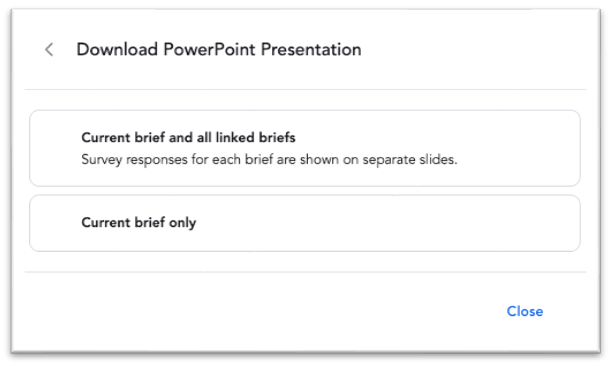
In March, we’ve released PPT Exports for Linked Briefs. This enables you to download a consolidated deck that includes the results from all the linked briefs launched in your research project. When using the PPT export for Linked Briefs, clients can choose between a consolidated deck or a deck that only includes the results from the specific brief they are analysing.
Benefits
- Save time with a one-click consolidated export. Quickly generate a single deck with all linked brief results, removing the need for multiple downloads.
- Easily compare results across multiple briefs. View insights from different briefs side by side in one place, making analysis more efficient
- Eliminate manual merging of decks. Avoid the need to combine multiple PowerPoint files, reducing manual work and potential errors
- Faster turnaround from fulfilment to reporting. Move from data collection to sharing insights more quickly, helping teams act on results sooner
Notification Center
Challenge
Staying informed is key to driving community engagement across the platform. Previously, there was no notification centre within the web platform, which meant community members could lose track of what was going on, including the latest activities, new briefs, and rewards.
What is it?
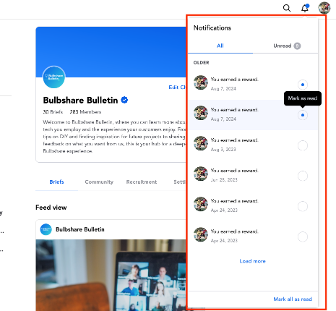
In March, the SMG product team released the Notification Centre, a new environment within MyBulbshare.com where users can receive all platform notifications in one place.
This ensures users are aware of key in-platform events, such as new briefs, follower activity, and reward qualification, and can take action immediately. It also includes a filter to view unread notifications.
Benefits
- Stay up to date with all key platform activity in one place. Access all important notifications in a single view, without needing to navigate across different areas of the platform.
- Never miss new briefs, rewards, or important updates. Ensure users are always informed of key activities and opportunities as they happen.
- Take immediate action directly from notifications. Quickly respond to relevant events and stay engaged with ongoing activity.
- Improve engagement and participation across the community. Encourage more consistent interaction by keeping users informed and connected to what’s happening in real time
Project Filter for Location Home
Challenge
Users with access to multiple projects can find it difficult to quickly and easily switch between locations.
What is it?
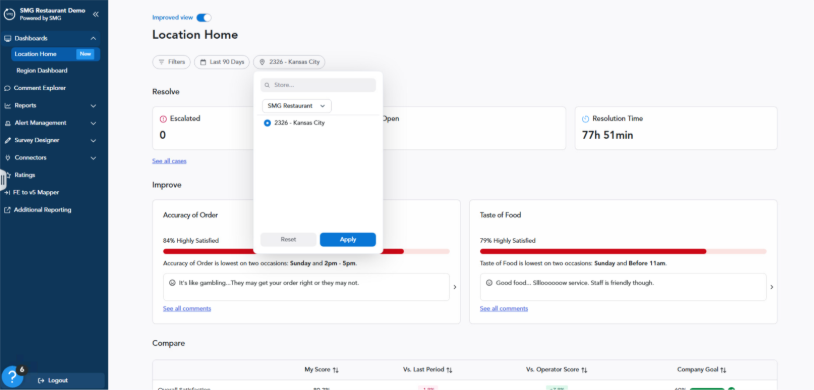
Project filter on Location Home will allow users to clearly see and switch between projects.
The filter displays human-readable project names and updates all data on the page based on the selected project. Store filter options are also scoped to the selected project, ensuring users only see relevant locations.
The selected project persists throughout the session and defaults to a primary project on login. Users with access to only one project will not see any changes.
Benefits
- Removes ambiguity around which project data is being viewed
- Reduces risk of analyzing incorrect data
- Makes it easy to switch between projects without re-authentication